


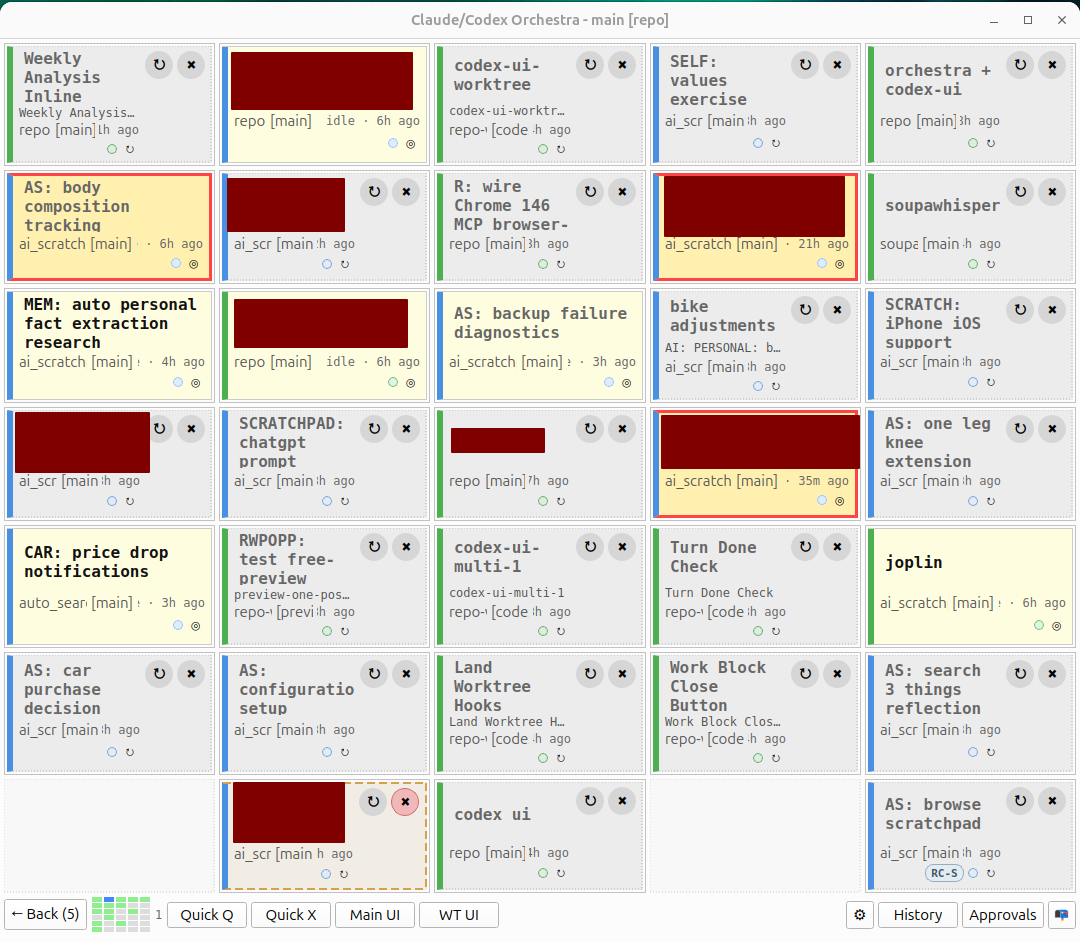
AI usage for this post: I wrote the draft on my own. While writing, I used Claude Code to look up references. Then Claude Code fixed typos and reviewed the draft, I addressed comments manually.Epistemics: my own observations often inspired by conversations on X and Zvi’s summaries.As Zvi likes to repeat Language Models Offer Mundane Utility. Agent harnesses is the most advanced way to use language models. At the same time, they are not perfect – the capabilities frontier is jagged, sometimes they make mistakes and sometimes they just nuke your 15 year photo collection or production database. Thus, it is a skill how to use AI agents efficiently and I want to get better at it.What tips, tricks, approaches are you using to improve your efficiency when using agent harnesses? I personally focus on Claude Code & Codex CLI mostly for single person software development, but I welcome suggestions for other tools and other areas of use. Ideally you share what you tried and what works for you and I try it myself and see whether it improves my workflow.Here are my discoveries (with level of confidence).Use best model and highest thinking/effort (no brainer)The best available model and its thinking effort usually produces best results and requires less handholding. You have to be extra careful with what this means, e.g. Claude Code has high thinking effort by default, but the best level is max, which you need to actively turn on yourself. Unless you are very sensitive to speed and cost, you should do this. It might work a bit longer and consume more tokens, but this is much better than requiring multiple iterations from you.worktrees (no brainer)When working on code in a git repo, let each AI session have its own git branch with worktree. This way they can work in parallel and not fight to edit same files. Intuitively this would lead to merge hell, but fortunately AIs are good at merging./fast (depends on how you work)Codex CLI allows you to turn on /fast mode, which speeds up processing 1.5 times, but consumes your token quota 2x faster. If you work on highly interactive tasks, which require lots of your input and you are not constrained by money (e.g. can afford $200 subscription), you should do this. In my experience, without /fast, AI is slow enough that I can juggle 5-6 sessions before any finishes. With /fast, sessions finish quickly enough that I only need 2-3 at a time. The smaller batch means less context switching, which I find more productive overall.The toggle is global, so it affects all your sessions at once.Claude Code also has /fast to speed up processing 2.5 times, but don’t run to turn it on yet – it charges you extra in addition to subscription using API prices and it is very expensive ($2-5/minute/agent). I haven’t tried it.Verbose logging (depends on what you are working on)I discovered that my software development efficiency grew greatly once I started having extremely verbose logging. The idea is once something goes wrong, this gives AI a trace of what has happened and I can just describe very briefly the higher-level symptom and it can investigate from the logs on its own. This is especially useful when the issue is hard to reproduce or happens occasionally. Another variation of this is to have some way to export debug information from your app and reference a specific object or instance. This way when something goes wrong, you just feed that to AI after one click and let it investigate.AIs have bad days (sometimes)I don’t know the reason, but once in a while I get a couple days when AI just seems incapable of doing anything. Previously after one message it would correctly implement a bunch of stuff and now it keeps misunderstanding what I want and I need 30 iterations and it still does not get it and the process never converges. In this case I switch to the competitor (basically Opus 4.6 <> GPT5.4). The key is to detect this early and switch early. This is very sad, because migrating all the skills and setups between Claude Code and Codex sucks and I don’t have an efficient way to do this.Memory across sessions (WIP)I haven’t found a solution to this myself, but I strongly believe that this would have huge impact. I want the current AI session to seamlessly have access to all past information I provided to it. Both Claude and ChatGPT have this implemented in their web interfaces, but not in Claude Code / Codex CLI. I am currently experimenting with github.com/doobidoo/mcp-memory-service. Issues discovered:It is developer oriented (e.g. mostly technical facts and choices), but I want generic memory system (e.g. for personal background too).Autosaving of memories does not work – Claude ignores CLAUDE.md and the session end approach seems to be regexp based.The memory retrieval seems to be fine. I am experimenting with using a separate Claude session in the background to extract memories from every message.If you found a good solution you are happy with, please tell.Ask to review in a new session (useful)To my surprise just asking a new session of the same AI to review plan or work often brings useful insights, which the original session missed. You can also ask different AI too. My hypothesis is that the original session had to care about lots of details, so its attention was dispersed, but the new session can focus only on this particular review and, thus, have higher effective brain power allocated to it.You are the bottleneckThis is a guiding principle for multiple ideas. Basically, in my experience AI works well enough most of the time and the main bottleneck to getting stuff done is me.Auto resolve permission requests (no brainer)The first way I bottleneck AI is by reviewing its requests for permissions to do stuff. Many people resolve this by YOLO mode, where AI can do everything it wants. I like my photos and production databases, so I don’t feel comfortable doing this. I am also worried about prompt injections from the web.I see 2 ways to partially resolve this issue:Allowlist obviously safe commands as much as you can. Basically after every approval you gave, ask yourself whether this command is safe for AI to run on its own. This does not get you far, because the allowlist is pattern-based, so often the safety of the command depends on the context and its parameters.Let another AI review permission requests. In Claude Code this is done via Auto Mode. Before Auto Mode existed I wrote my own solution via hooks (Claude Code exposes permission requests via hooks, Codex does not, but it has App Server and you can implement such reviewer that way). By using my own solution, I control the prompt and model used, the reviewer agent can use tools and multiple steps as well. E.g. to avoid prompt injection I allow all internet requests that do not expose any private data. I haven’t tried Auto Mode.Some people run AI in YOLO mode on a server, basically reducing the worst case scenario of a failure. I still don’t like this, because it can still leak your git API key and your repo.Many people I know just YOLO and never had any issue.The main message here is reviewing every permission request kills your efficiency. Find some way to solve this.Notifications for permission requests (no brainer)By default you don’t get any indication that AI needs your attention to review its permission requests except a text in the terminal. Thus, when working on multiple AI sessions in parallel, it is very easy to miss. You should set up at least a sound notification for new permission requests that require your attention or AI finishing its turn (it is either done or needs your input).Overview of all sessions (useful)If you just add a sound notification and you have 10 sessions across virtual workspaces, finding the correct window is cumbersome. I solved this by making my own dashboard to oversee the state of all sessions. I don’t think making something this polished is a good idea for you, because it took lots of iterations. Claude Code hooks are fairly fragile. Codex has extremely poor hooks. If there is a ready-made solution you use for this and you are happy with it, please tell. The main idea here is that you need some way to quickly identify what session requires your attention without checking all of them.Offload as much as you can to AI (no brainer)Your attention is the bottleneck, so if you can let AI do even a bit of what you would have to do otherwise, you should. Even if it takes much longer for AI to accomplish.In my case, I made a skill for it to present its UI changes for me. It runs the website in a docker in a worktree, completely prepares the database to the state needed for the UI test, tests the UI on its own and fixes whatever issues it finds. Then it prepares the exact screen which I need to review and gives me an overview of what I need to check and what the context is. I just look through the minimum necessary flow and either LGTM or tell it what to fix and then it repeats. This is not perfect, because often it ends up presenting wrong state or starts too far from the interesting part, but this is much faster than me trying to prepare the correct state of the DB on my own. There are also tools like Storybook to review UIs with mock data.The main message here is to understand how this applies to your use case and let AI do as much of the boring work as you can get away with.Easy way to trigger subagents (sometimes)Example – I have 5 test cases to review. I tell AI to start 5 new sessions – one per test case – and they test them and prepare the review in parallel (see “Offload as much as you can to AI” above).I feel like this should be a way to gain more leverage easily, but I struggle to come up with effective ways to do this. Also I rarely have easy-to-parallelize cases like the example above.Your own UI (questionable)I wrote my own UI to wrap Codex’s App Server. My main goals were Auto Review of permissions and better hooks. Overall, I found this very interesting, because I could see how I use this tool, find inefficiency and immediately address it. E.g. I can choose how much information I want to see from the AI. The main downside is that the complexity grows fast, so developing this takes lots of time, so I suspect overall it was net negative, but an interesting exercise. Also due to AIs having bad days, I have to switch to Claude occasionally and its SDK seems much worse to wrap, so I don’t have support for it yet.I didn’t expect to write that many ideas of mine here, but it was useful to list all of them. I would love to hear your ideas how to use AI agents more efficiently.Discuss Read More
The Skill of Using AI Agents Well
AI usage for this post: I wrote the draft on my own. While writing, I used Claude Code to look up references. Then Claude Code fixed typos and reviewed the draft, I addressed comments manually.Epistemics: my own observations often inspired by conversations on X and Zvi’s summaries.As Zvi likes to repeat Language Models Offer Mundane Utility. Agent harnesses is the most advanced way to use language models. At the same time, they are not perfect – the capabilities frontier is jagged, sometimes they make mistakes and sometimes they just nuke your 15 year photo collection or production database. Thus, it is a skill how to use AI agents efficiently and I want to get better at it.What tips, tricks, approaches are you using to improve your efficiency when using agent harnesses? I personally focus on Claude Code & Codex CLI mostly for single person software development, but I welcome suggestions for other tools and other areas of use. Ideally you share what you tried and what works for you and I try it myself and see whether it improves my workflow.Here are my discoveries (with level of confidence).Use best model and highest thinking/effort (no brainer)The best available model and its thinking effort usually produces best results and requires less handholding. You have to be extra careful with what this means, e.g. Claude Code has high thinking effort by default, but the best level is max, which you need to actively turn on yourself. Unless you are very sensitive to speed and cost, you should do this. It might work a bit longer and consume more tokens, but this is much better than requiring multiple iterations from you.worktrees (no brainer)When working on code in a git repo, let each AI session have its own git branch with worktree. This way they can work in parallel and not fight to edit same files. Intuitively this would lead to merge hell, but fortunately AIs are good at merging./fast (depends on how you work)Codex CLI allows you to turn on /fast mode, which speeds up processing 1.5 times, but consumes your token quota 2x faster. If you work on highly interactive tasks, which require lots of your input and you are not constrained by money (e.g. can afford $200 subscription), you should do this. In my experience, without /fast, AI is slow enough that I can juggle 5-6 sessions before any finishes. With /fast, sessions finish quickly enough that I only need 2-3 at a time. The smaller batch means less context switching, which I find more productive overall.The toggle is global, so it affects all your sessions at once.Claude Code also has /fast to speed up processing 2.5 times, but don’t run to turn it on yet – it charges you extra in addition to subscription using API prices and it is very expensive ($2-5/minute/agent). I haven’t tried it.Verbose logging (depends on what you are working on)I discovered that my software development efficiency grew greatly once I started having extremely verbose logging. The idea is once something goes wrong, this gives AI a trace of what has happened and I can just describe very briefly the higher-level symptom and it can investigate from the logs on its own. This is especially useful when the issue is hard to reproduce or happens occasionally. Another variation of this is to have some way to export debug information from your app and reference a specific object or instance. This way when something goes wrong, you just feed that to AI after one click and let it investigate.AIs have bad days (sometimes)I don’t know the reason, but once in a while I get a couple days when AI just seems incapable of doing anything. Previously after one message it would correctly implement a bunch of stuff and now it keeps misunderstanding what I want and I need 30 iterations and it still does not get it and the process never converges. In this case I switch to the competitor (basically Opus 4.6 <> GPT5.4). The key is to detect this early and switch early. This is very sad, because migrating all the skills and setups between Claude Code and Codex sucks and I don’t have an efficient way to do this.Memory across sessions (WIP)I haven’t found a solution to this myself, but I strongly believe that this would have huge impact. I want the current AI session to seamlessly have access to all past information I provided to it. Both Claude and ChatGPT have this implemented in their web interfaces, but not in Claude Code / Codex CLI. I am currently experimenting with github.com/doobidoo/mcp-memory-service. Issues discovered:It is developer oriented (e.g. mostly technical facts and choices), but I want generic memory system (e.g. for personal background too).Autosaving of memories does not work – Claude ignores CLAUDE.md and the session end approach seems to be regexp based.The memory retrieval seems to be fine. I am experimenting with using a separate Claude session in the background to extract memories from every message.If you found a good solution you are happy with, please tell.Ask to review in a new session (useful)To my surprise just asking a new session of the same AI to review plan or work often brings useful insights, which the original session missed. You can also ask different AI too. My hypothesis is that the original session had to care about lots of details, so its attention was dispersed, but the new session can focus only on this particular review and, thus, have higher effective brain power allocated to it.You are the bottleneckThis is a guiding principle for multiple ideas. Basically, in my experience AI works well enough most of the time and the main bottleneck to getting stuff done is me.Auto resolve permission requests (no brainer)The first way I bottleneck AI is by reviewing its requests for permissions to do stuff. Many people resolve this by YOLO mode, where AI can do everything it wants. I like my photos and production databases, so I don’t feel comfortable doing this. I am also worried about prompt injections from the web.I see 2 ways to partially resolve this issue:Allowlist obviously safe commands as much as you can. Basically after every approval you gave, ask yourself whether this command is safe for AI to run on its own. This does not get you far, because the allowlist is pattern-based, so often the safety of the command depends on the context and its parameters.Let another AI review permission requests. In Claude Code this is done via Auto Mode. Before Auto Mode existed I wrote my own solution via hooks (Claude Code exposes permission requests via hooks, Codex does not, but it has App Server and you can implement such reviewer that way). By using my own solution, I control the prompt and model used, the reviewer agent can use tools and multiple steps as well. E.g. to avoid prompt injection I allow all internet requests that do not expose any private data. I haven’t tried Auto Mode.Some people run AI in YOLO mode on a server, basically reducing the worst case scenario of a failure. I still don’t like this, because it can still leak your git API key and your repo.Many people I know just YOLO and never had any issue.The main message here is reviewing every permission request kills your efficiency. Find some way to solve this.Notifications for permission requests (no brainer)By default you don’t get any indication that AI needs your attention to review its permission requests except a text in the terminal. Thus, when working on multiple AI sessions in parallel, it is very easy to miss. You should set up at least a sound notification for new permission requests that require your attention or AI finishing its turn (it is either done or needs your input).Overview of all sessions (useful)If you just add a sound notification and you have 10 sessions across virtual workspaces, finding the correct window is cumbersome. I solved this by making my own dashboard to oversee the state of all sessions. I don’t think making something this polished is a good idea for you, because it took lots of iterations. Claude Code hooks are fairly fragile. Codex has extremely poor hooks. If there is a ready-made solution you use for this and you are happy with it, please tell. The main idea here is that you need some way to quickly identify what session requires your attention without checking all of them.Offload as much as you can to AI (no brainer)Your attention is the bottleneck, so if you can let AI do even a bit of what you would have to do otherwise, you should. Even if it takes much longer for AI to accomplish.In my case, I made a skill for it to present its UI changes for me. It runs the website in a docker in a worktree, completely prepares the database to the state needed for the UI test, tests the UI on its own and fixes whatever issues it finds. Then it prepares the exact screen which I need to review and gives me an overview of what I need to check and what the context is. I just look through the minimum necessary flow and either LGTM or tell it what to fix and then it repeats. This is not perfect, because often it ends up presenting wrong state or starts too far from the interesting part, but this is much faster than me trying to prepare the correct state of the DB on my own. There are also tools like Storybook to review UIs with mock data.The main message here is to understand how this applies to your use case and let AI do as much of the boring work as you can get away with.Easy way to trigger subagents (sometimes)Example – I have 5 test cases to review. I tell AI to start 5 new sessions – one per test case – and they test them and prepare the review in parallel (see “Offload as much as you can to AI” above).I feel like this should be a way to gain more leverage easily, but I struggle to come up with effective ways to do this. Also I rarely have easy-to-parallelize cases like the example above.Your own UI (questionable)I wrote my own UI to wrap Codex’s App Server. My main goals were Auto Review of permissions and better hooks. Overall, I found this very interesting, because I could see how I use this tool, find inefficiency and immediately address it. E.g. I can choose how much information I want to see from the AI. The main downside is that the complexity grows fast, so developing this takes lots of time, so I suspect overall it was net negative, but an interesting exercise. Also due to AIs having bad days, I have to switch to Claude occasionally and its SDK seems much worse to wrap, so I don’t have support for it yet.I didn’t expect to write that many ideas of mine here, but it was useful to list all of them. I would love to hear your ideas how to use AI agents more efficiently.Discuss Read More
Related Posts

What’s Your P(WEIRD)?
Published on February 16, 2026 6:19 PM GMTEpistemic status: the other thing that keeps me…
Biotech Startup Stats
Published on February 5, 2026 6:40 PM GMTOne thing Claude Code has really made too…
Chess bots do not have goals
Published on February 4, 2026 9:11 PM GMTI see the opposite claim made in The…